DAVINCI / INSIGHTS
A camera provides the view. The recorder determines how that view is stored, found and used later. Choosing the right recording system is therefore an operational decision, not only a hardware purchase.
Three names, different architectures
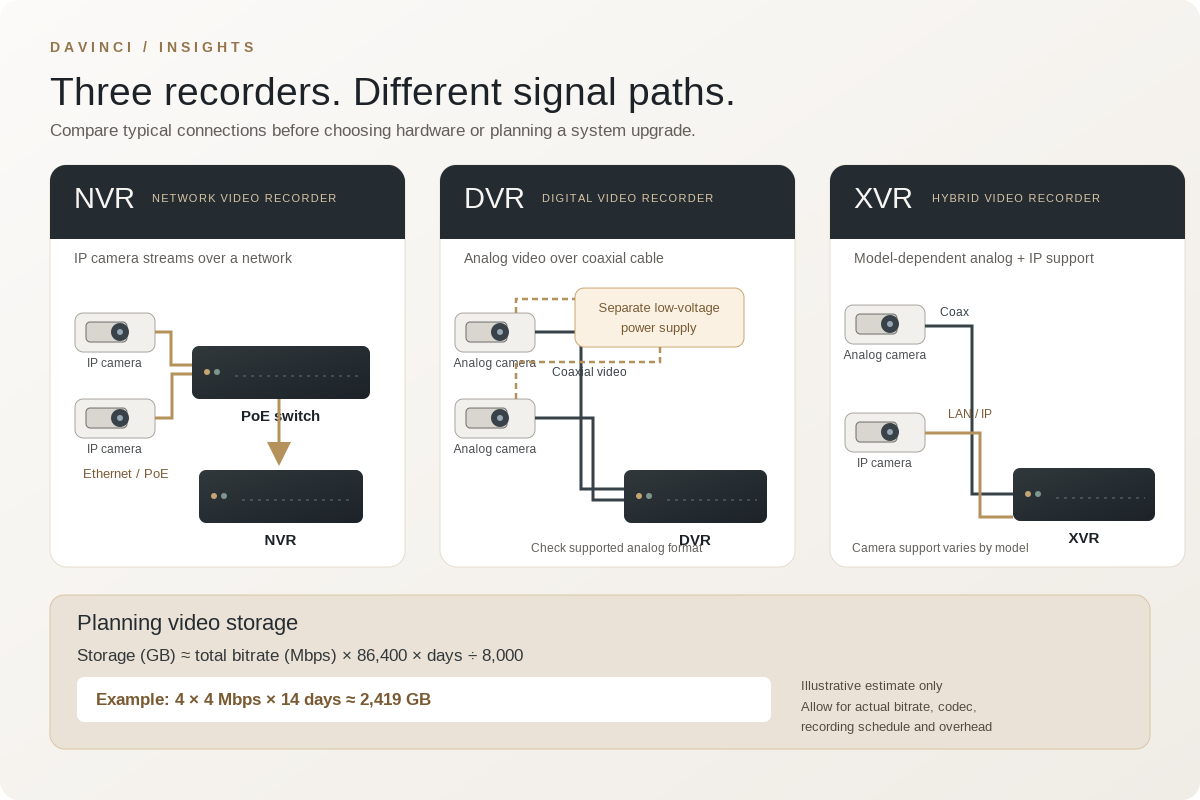
NVR typically refers to a network video recorder receiving compatible streams from IP cameras. DVR generally describes a recorder designed for supported analog camera signals. XVR is commonly used for recorders that support more than one signal family, but the formats and combinations supported vary by model.
These names are useful starting points, not universal compatibility guarantees. Always confirm the specific camera protocol or signal mode, supported firmware, channel capabilities and any feature limitations.
Channel count is not the whole specification
An eight-channel recorder does not necessarily record eight cameras at every resolution and frame rate. An NVR may have an incoming bitrate ceiling, while other recorders can limit simultaneous playback, decoding or analytics. Clarify the full expected load rather than comparing device counts alone.
In larger installations, decide who will review recordings, how many people need simultaneous access and whether operators must search several cameras at once. Retrieval speed and usable interfaces matter just as much as storage volume.
How much storage is enough?
Retention depends on actual video bitrate, number of cameras, recording schedule, codecs, motion or event activity and the retention rules applicable to the site. A simple planning estimate is:
Storage in GB ≈ total bitrate in Mbps × 86,400 × days ÷ 8,000.
For example, four cameras averaging 4 Mbps each over 14 days require approximately 2,419 GB before practical overhead and any variations in bitrate are considered. This is an illustration, not a product guarantee. Test the selected settings under real operating conditions and allow appropriate headroom.
Reliability means being able to recover the footage
Choose drives confirmed as compatible with the recorder and expected workload. Monitor health, define who responds to storage faults and document the consequences of power or network failure. RAID, where available, is not the same as a separate backup strategy. Evidence handling should include access permissions, export formats, timestamps and an audit trail where required.
Five questions before procurement
- Which exact camera types and protocols are supported?
- What incoming and recording throughput is available at the intended settings?
- How many days of footage are required by operational needs and applicable law?
- How will authorized staff search, export and safeguard recordings?
- What happens if power, a disk or network connectivity fails?
Recording settings deserve a commissioning test
Before accepting a recorder, verify the saved footage under the real motion, lighting and network conditions of the installation. Review both normal recording and event-triggered schedules; check timestamps, time-zone behavior and the ability to export a usable segment.
Storage calculations are estimates. Actual retention changes when codecs, scene complexity, bitrates or recording schedules change. Document both planned retention and the observed result.
Think beyond the recorder box
Authorized reviewers need an understandable path from incident notification to the correct camera and time window. Clarify the available audit logs, search functions, export permissions and the process used to preserve footage for an investigation.
Network, power and physical access security are part of recorder reliability. Keep administrative access restricted and verify the manufacturer-approved maintenance and firmware-support process.
DAVINCI perspective: Good recording design makes information available to the right people when it matters, without sacrificing reliability or responsible access.