
DAVINCI / INSIGHTS
Smart-home products can look interchangeable in a showroom but behave very differently once installed together. Understanding the difference between a radio network, an application standard and a control platform prevents many compatibility surprises.
Wi-Fi: familiar infrastructure, different demands
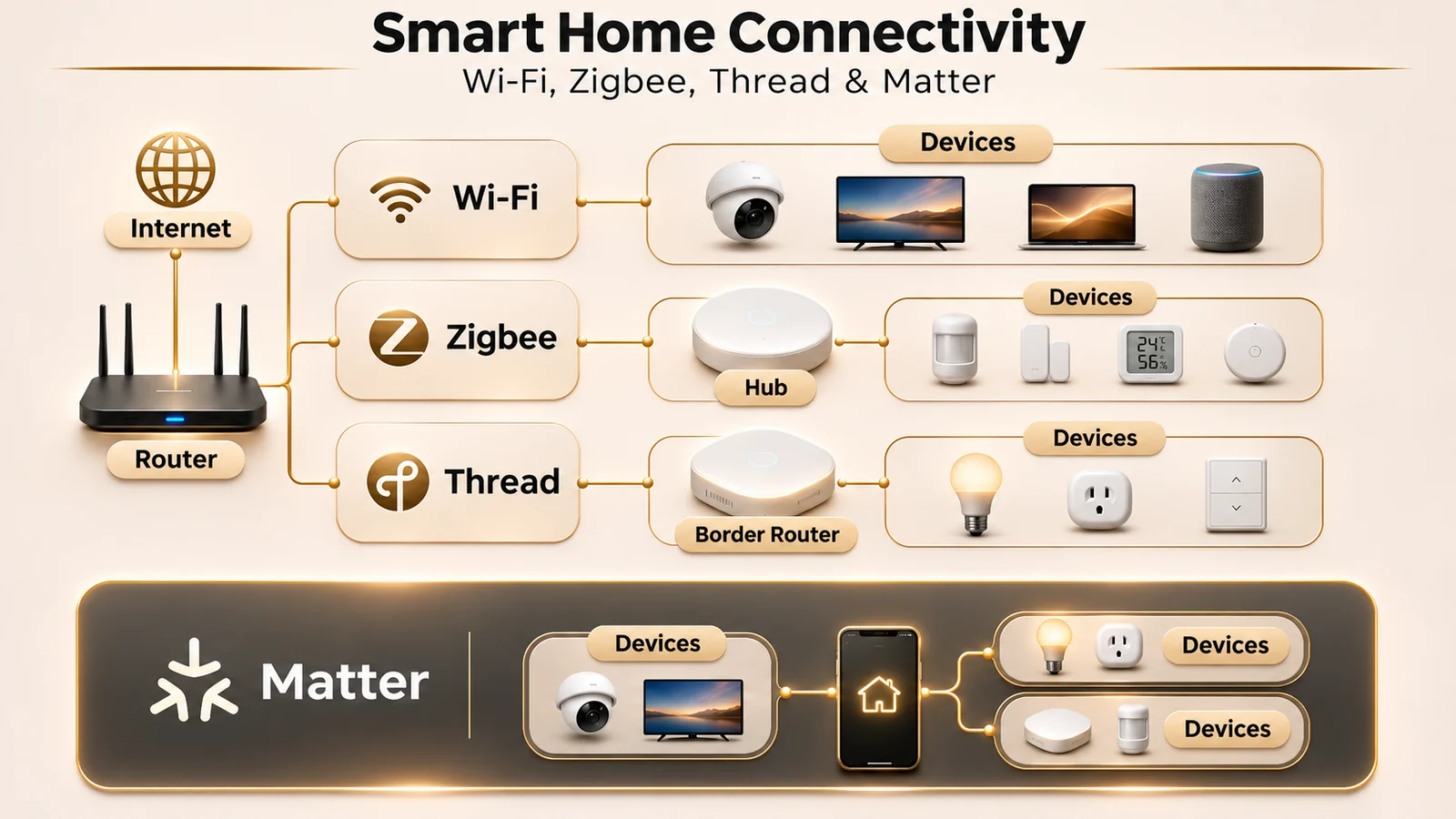
Wi-Fi products connect using an IP network and may integrate directly with home routers, cloud services or local applications depending on design. This can be convenient, especially for high-data devices, but the quality of wireless coverage and router capacity matters.
Avoid assuming every Wi-Fi device works locally without an internet connection. Check product-specific behavior, security support and what happens when cloud services become unavailable.
Zigbee: a dedicated low-power network
Zigbee is commonly used for sensors, switches and other low-power devices. Networks often depend on a coordinator or hub, and compatible mains-powered devices may participate in mesh routing. Support and pairing behavior can vary by ecosystem.
A Zigbee label does not guarantee that every device exposes every feature through every hub. Test interoperability at the exact product level.
Thread: an IP-based mesh transport
Thread is a low-power IPv6 mesh networking technology used by some connected-home products. A Thread border router connects the Thread network to other IP networks. Thread itself is not an all-purpose smart-home user interface.
The distinction matters: joining a Thread network is different from supporting a particular controller’s application features.
Matter: interoperability at the application layer
Matter is an application-level connectivity standard designed to improve cross-ecosystem interoperability over supported network transports, including Wi-Fi, Ethernet and Thread. A product can support Thread without supporting Matter, and a Matter product is not necessarily a Thread device.
Feature availability depends on the Matter device type, supported version and the controlling platform. Confirm which functions are actually exposed, including advanced settings and manufacturer-specific capabilities.
Design around the experience, not the logo
Specify whether lighting, curtains, sensors and locks must work without internet, whether multiple users or platforms need control, and what maintenance will be required. Document gateway, hub and border-router dependencies before purchasing a large fleet.
In a premium smart home, interoperability should be verified as an end-to-end user journey rather than inferred from a badge on the carton.
Plan the network before specifying devices
Draw the home floor plan and identify router locations, dense walls, distribution boards and areas where sensors must work without internet. Wi-Fi signal strength, Zigbee coordinator placement and Thread border-router coverage are separate planning questions. Battery devices may not relay mesh traffic, while some mains-powered devices can; check actual product behavior.
Use a compatibility test sheet
Record the exact device model, firmware, radio protocol, hub or controller, application platform, offline functionality and exposed controls. Then test pairing, automation response, reconnection after a power outage and behavior when the broadband connection is disconnected. This catches incompatibilities that a shared logo cannot resolve.
DAVINCI perspective: Thoughtful planning starts with site conditions and real users. Product suitability, installation details and local requirements must always be checked for the actual project.